- reliable protocol
- FTP = file transfer protocol
- by default data transfer port no.20
- by default connection port no. 21
in this tutorial you will learn very easily how to configuration ftp Server. ftp server reliable protocol and data download and data transfer very secure.watch carefully and follow step on step.
1. Install FTP Package using by yum
#yum install vsftpd* -y
vsftpd = v-very s-secure f-file t- transfer p-protocol d-Daemon
2.restart services
#service vsftpd restart
#chkconfig vsftpd on

3. Open FTP Server default folder
#cd /var/ftp
create any document and file here

nd how to seen file and folder in ftp folder to type command
#ls
how to create file and folder
create folder
#mkdir a

create file
#vim a.txt
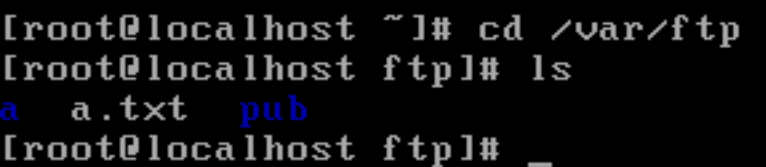
#ls (show all file and folders in ftp folder)
your ftp server configuration complete successfully.
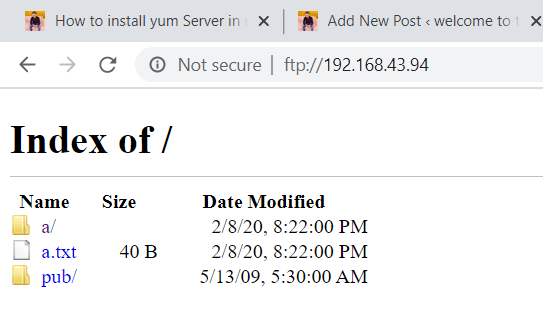
open any browser in window system
ftp://192.168.43.229
      (type your redhat system ip which is your ftp server)

how to check your ip address in redhat
#ifconfig
 Welcome To Technical World
very good post bro.
well done
keep it up.
LikeLiked by 1 person
thanku bhai rd saini
LikeLiked by 1 person